Dicom File Viewer1.0.39
Publisher Description



Simple dicom viewer for test.
This app is a simple and useful medical image file DICOM (*.dcm, *.dicom) file viewer.
Open the DICOM (*.dcm, *.dicom) files stored in your Android phone, web hard drive, DVD, CD, or PACS,
It can be operated as simply as a PACS viewer.
※ This app is not PACS(picture archiving and communication system)
Do not use for medical purposes. For viewing DICOM files, for testing purposes.
[Features]
· File explorer allows you to browse folders and files, easily find all files, and open files in DICOM format.
· You can open files such as *.dcm, *.dicom, and *.jpg.
· Cannot open DICOM files in all compressed formats. Some compressed DICOM video formats can be opened with the viewer.
· Through the viewer, you can read the video of the dicom file, edit the window level, etc., and read the dicom tag stored in the dicom file.
· Viewer function
- Pan/Zoom (You can move and zoom.)
- Window Level (Adjusts the window level.)
- Invert
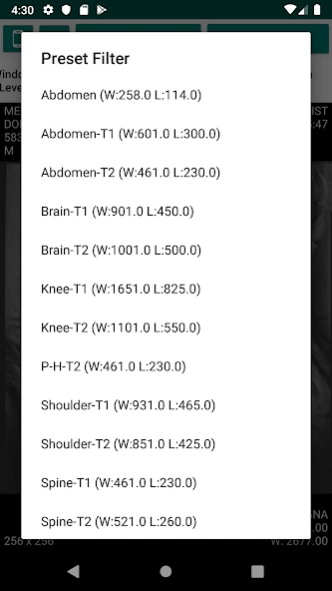
- Preset (Apply a predefined value.)
- Manual WC/WW (Adjust the window level manually.)
- Make One Series (All files in a specific folder are considered as one series, and you can view the previous/next video by organizing it into slides.)
- Dicom Info (Show or hide DICOM information.)
- DICOM Tags (Shows DICOM Header information.)
- Default Character Set (Sets the default language to read DICOM Header.)
(ISO_646,ISO_8859_1~9,JIS_X_201,TIS_620,JIS_X_208,JIS_X_212,KS_X_1001,GB2312,UTF_8,GB18030)
[Required rights]
• Required access rights
- Storage: Required to search folder and file lists and open file.
[Notice]
* For android 11
- According to Google policy change, user with Android 11, you must have the new permission.
It's still prototype and lacks functionality.
And It does not support all compression types of dicom files.
I will gradually improve this application.
(someday...)
[reference link]
: If the dicom file does not open in my app, please follow the instructions below.
* On Window PC
https://www.microdicom.com/downloads.html
-> download Portable zip package
-> open dicom file
-> microdicom file Menu , Export , To Dicom file.. and click Export
-> this file copy to your phone.
-> open this dicom file on my app.
Thank you for using this app.
About Dicom File Viewer
The company that develops Dicom File Viewer is 꿈꾸는 개발자.. The latest version released by its developer is 1.0.39.
To install Dicom File Viewer on your Android device, just click the green Continue To App button above to start the installation process. The app is listed on our website since 2026-09-24 and was downloaded 36 times. We have already checked if the download link is safe, however for your own protection we recommend that you scan the downloaded app with your antivirus. Your antivirus may detect the Dicom File Viewer as malware as malware if the download link to com.posko777.tool.dicomviewer is broken.
How to install Dicom File Viewer on your Android device:
- Click on the Continue To App button on our website. This will redirect you to Google Play.
- Once the Dicom File Viewer is shown in the Google Play listing of your Android device, you can start its download and installation. Tap on the Install button located below the search bar and to the right of the app icon.
- A pop-up window with the permissions required by Dicom File Viewer will be shown. Click on Accept to continue the process.
- Dicom File Viewer will be downloaded onto your device, displaying a progress. Once the download completes, the installation will start and you'll get a notification after the installation is finished.
Program Details
System requirements
Download information
Pricing
Version History
version 1.0.39
posted on 2026-09-24
- Organize CD images neatly by patient and study (Settings > Study list)
- View several images side by side and scroll them together
- Compare an earlier scan with the current one
- Use the magnifier to see small details up close
- Fixed patient names that looked broken
- Added a help guide (Settings > Help)
- Faster and more stable
version 1.0.37
posted on 2026-07-17
* Sorry our app is not perfect, not support all dicom types.
We are continuously working to improve the app to support many types of DICOM.
Thank you for using this app :)
version 1.0.36
posted on 2025-12-21
* Switched libraries for better performance.
* banner bug fix.
Sorry our app is not perfect, not support all dicom types.
We are continuously working to improve the app to support many types of DICOM.
Thank you for using this app :)
version 1.0.33
posted on 2025-11-29
* Add a 'Fix' button.
- Please press the button if the app has crashed, or if images load but the screen remains black.
* bug fix.
Sorry our app is not perfect, not support all dicom types.
We are continuously working to improve the app to support many types of DICOM.
Thank you for using this app :)
version 1.0.30
posted on 2025-09-11
* bug fix.
Sorry our app is not perfect, not support all dicom types.
We are continuously working to improve the app to support many types of DICOM.
Thank you for using this app :)
version 1.0.24
posted on 2023-06-07
* bug fix :
Hello, my app is not perfect, it doesn't support all dicom types.
We are continuously working to improve the app to support different types of DICOM.
Thanks for using my app :)
version 1.0.23
posted on 2022-10-19
* For android 11
- According to Google policy change, user with Android 11, you must have the new permission.
version 1.0.19
posted on 2021-02-10
* bug fix.
version 1.0.15
posted on 2020-06-26
* Show play button when dicom file has multi frame.
* Default Charset settings added.
* bug fix.
